For some time, we’ve talked about GitHub Copilot as if it were a clever autocomplete engine.
It isn’t.
Or rather, that’s not all it is.
The interesting thing — the thing that genuinely changes how you work — is that you can assign GitHub issues to Copilot.
And it behaves like a contributor.
Over the past day, I’ve been doing exactly that on my new CPAN module, WebServer::DirIndex. I’ve opened issues, assigned them to Copilot, and watched a steady stream of pull requests land. Ten issues closed in about a day, each one implemented via a Copilot-generated PR, reviewed and merged like any other contribution.
That still feels faintly futuristic. But it’s not “vibe coding”. It’s surprisingly structured.
Let me explain how it works.
It Starts With a Proper Issue
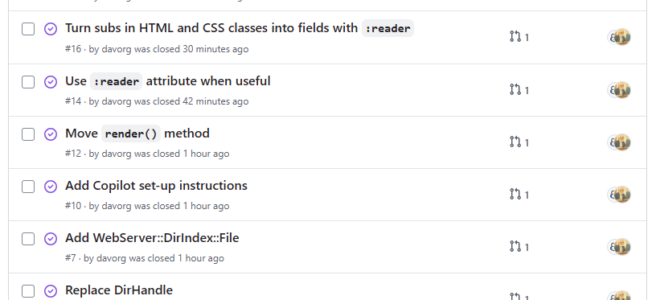
This workflow depends on discipline. You don’t type “please refactor this” into a chat window. You create a proper GitHub issue. The sort you would assign to another human maintainer. For example, here are some of the recent issues Copilot handled in WebServer::DirIndex:
- Add CPAN scaffolding
- Update the classes to use Feature::Compat::Class
- Replace DirHandle
- Add WebServer::DirIndex::File
- Move
render()method - Use
:readerattribute where useful - Remove dependency on Plack
Each one was a focused, bounded piece of work. Each one had clear expectations.
The key is this: Copilot works best when you behave like a maintainer, not a magician.
You describe the change precisely. You state constraints. You mention compatibility requirements. You indicate whether tests need to be updated.
Then you assign the issue to Copilot.
And wait.
The Pull Request Arrives
After a few minutes — sometimes ten, sometimes less — Copilot creates a branch and opens a pull request.
The PR contains:
- Code changes
- Updated or new tests
- A descriptive PR message
And because it’s a real PR, your CI runs automatically. The code is evaluated in the same way as any other contribution.
This is already a major improvement over editor-based prompting. The work is isolated, reviewable, and properly versioned.
But the most interesting part is what happens in the background.
Watching Copilot Think
If you visit the Agents tab in the repository, you can see Copilot reasoning through the issue.
It reads like a junior developer narrating their approach:
- Interpreting the problem
- Identifying the relevant files
- Planning changes
- Considering test updates
- Running validation steps
And you can interrupt it.
If it starts drifting toward unnecessary abstraction or broad refactoring, you can comment and steer it:
- Please don’t change the public API.
- Avoid experimental Perl features.
- This must remain compatible with Perl 5.40.
It responds. It adjusts course.
This ability to intervene mid-flight is one of the most useful aspects of the system. You are not passively accepting generated code — you’re supervising it.
Teaching Copilot About Your Project
Out of the box, Copilot doesn’t really know how your repository works. It sees code, but it doesn’t know policy.
That’s where repository-level configuration becomes useful.
1. Custom Repository Instructions
GitHub allows you to provide a .github/copilot-instructions.md file that gives Copilot repository-specific guidance. The documentation for this lives here:
When GitHub offers to generate this file for you, say yes.
Then customise it properly.
In a CPAN module, I tend to include:
- Minimum supported Perl version
- Whether Feature::Compat::Class is preferred
- Whether experimental features are forbidden
- CPAN layout expectations (
lib/,t/, etc.) - Test conventions (Test::More, no stray diagnostics)
- A strong preference for not breaking the public API
Without this file, Copilot guesses.
With this file, Copilot aligns itself with your house style.
That difference is impressive.
2. Customising the Copilot Development Environment
There’s another piece that many people miss: Copilot can run a special workflow event called copilot_agent_setup.
You can define a workflow that prepares the environment Copilot works in. GitHub documents this here:
In my Perl projects, I use this standard setup:
|
1 2 3 4 5 6 7 8 9 10 11 12 13 14 15 16 17 18 19 20 21 22 23 24 25 26 27 |
name: Copilot Setup Steps on: workflow_dispatch: push: paths: - .github/workflows/copilot-setup-steps.yml pull_request: paths: - .github/workflows/copilot-setup-steps.yml jobs: copilot-setup-steps: runs-on: ubuntu-latest permissions: contents: read steps: - name: Check out repository uses: actions/checkout@v4 - name: Set up Perl 5.40 uses: shogo82148/actions-setup-perl@v1 with: perl-version: '5.40' - name: Install dependencies run: cpanm --installdeps --with-develop --notest . |
(Obviously, that was originally written for me by Copilot!)
Firstly, it ensures Copilot is working with the correct Perl version.
Secondly, it installs the distribution dependencies, meaning Copilot can reason in a context that actually resembles my real development environment.
Without this workflow, Copilot operates in a kind of generic space.
With it, Copilot behaves like a contributor who has actually checked out your code and run cpanm.
That’s a useful difference.
Reviewing the Work
This is the part where it’s important not to get starry-eyed.
I still review the PR carefully.
I still check:
- Has it changed behaviour unintentionally?
- Has it introduced unnecessary abstraction?
- Are the tests meaningful?
- Has it expanded scope beyond the issue?
I check out the branch and run the tests. Exactly as I would with a PR from a human co-worker.
You can request changes and reassign the PR to Copilot. It will revise its branch.
The loop is fast. Faster than traditional asynchronous code review.
But the responsibility is unchanged. You are still the maintainer.
Why This Feels Different
What’s happening here isn’t just “AI writing code”. It’s AI integrated into the contribution workflow:
- Issues
- Structured reasoning
- Pull requests
- CI
- Review cycles
That architecture matters.
It means you can use Copilot in a controlled, auditable way.
In my experience with WebServer::DirIndex, this model works particularly well for:
- Mechanical refactors
- Adding attributes (e.g.
:readerwhere appropriate) - Removing dependencies
- Moving methods cleanly
- Adding new internal classes
It is less strong when the issue itself is vague or architectural. Copilot cannot infer the intent you didn’t articulate.
But given a clear issue, it’s remarkably capable — even with modern Perl using tools like Feature::Compat::Class.
A Small but Important Point for the Perl Community
I’ve seen people saying that AI tools don’t handle Perl well. That has not been my experience.
With a properly described issue, repository instructions, and a defined development environment, Copilot works competently with:
- Modern Perl syntax
- CPAN distribution layouts
- Test suites
- Feature::Compat::Class (or whatever OO framework I’m using on a particular project)
The constraint isn’t the language. It’s how clearly you explain the task.
The Real Shift
The most interesting thing here isn’t that Copilot writes Perl. It’s that GitHub allows you to treat AI as a contributor.
- You file an issue.
- You assign it.
- You supervise its reasoning.
- You review its PR.
It’s not autocomplete. It’s not magic. It’s just another developer on the project. One who works quickly, doesn’t argue, and reads your documentation very carefully.
Have you been using AI tools to write or maintain Perl code? What successes (or failures!) have you had? Are there other tools I should be using?
Links
If you want to have a closer look at the issues and PRs I’m talking about, here are some links?

Very nice.
It might be an improvement if you also included direct links to the Issues you mentioned in the post.
Also the checkout action “actions/checkout” is now on v6 and not v4. You might want to update that both in the article and in your github repository and you might want to add dependabot to your github repo to send you PRs when the actions get new versions.
I meant to do that, but got distracted before publishing the post. I’ve added some links at the bottom of the post now. Sadly, the agent’s conversations with itself aren’t public.
Yes, I’ve stopped caring about that. I add
.github/dependabot.ymlto all of my repos and just wait for the PRs to come in 🙂I have modernised, refactored, re-documented only one Perl project so far, but I have been using Claude Code and Copilot CLI on a bunch of Python/Elixir/Ash/Phoenix projects since last year.
One project that may be interesting for the Perl community is Ash’s usage_rules package. It will scan other usage rules in all your Elixir and Ash dependencies and compose a AGENTS.md file with the best practices for your project.