Despite valiant attempts by the marketing departments of Microsoft and Sun, CGI is still the most commonly used architecture for creating dynamic content on the World Wide Web. In this series of tutorials we’ll look at how to write CGI programs. The second tutorial in the series looks at some of the security issues in CGI programming.
This article was originally published by Linux Format in May 2001.
Please note that these tutorials are only left here for historical interest. If you are writing new web applications with Perl these days, you should be considering something based on PSGI and Plack or even something using raw PSGI.
Introduction
Running a CGI program on a web server that is connected to the Internet is actually quite a brave thing to do. You’re giving anyone with an Internet connection permission to run a program on your server. You’d better be very sure that the program is secure and that it won’t allow anyone to do anything that you don’t want them to be able to do. This is an area where many beginners’ CGI tutorials are very weak and as a result there are a large number of web servers that are open to attack from crackers through CGI programs. I don’t want to give the impression that CGI is inherently insecure. It is no more insecure than any other web technology and it’s probably easier to make CGI secure. I just want to make the point that you need to consider security.What can possibly go wrong?
Before looking at how we can increase the security of our CGI programs, let’s just look at a few examples of what can go wrong. In the first example you have a simple CGI script that gets the name of a file as a parameter and display that file in the browser. A first attempt at writing this program might look like this.|
1 2 3 4 5 6 7 8 9 10 11 12 13 |
#!/usr/bin/perl -w use strict; use CGI ':standard'; my $file = param('filename'); print header(-type => 'text/plain'); open FILE, $file or die "Can't open $file: $!\n"; while (<FILE>) { print; } |
|
1 2 3 4 5 6 7 8 9 10 11 12 13 14 |
#!/usr/bin/perl -w use strict; use CGI ':standard'; my $dir = '/path/to/data/files/'; my $file = $dir . param('filename'); print header(-type => 'text/plain'); open FILE, $file or die "Can't open $file: $!\n"; while (<FILE>) { print; } |
|
1 2 3 4 5 6 7 8 9 10 11 12 |
#!/usr/bin/perl -w use strict; use CGI ':standard'; my $user = param('user'); my $who = `finger $user`; print header(-type => 'text/plain'); print "Here are the results for user $user\n\n"; print $who; |
Trust No-One
We’ve now seen a number of ways that CGI programs can be vulnerable to attack from users, how can we protect ourselves from these dangers? The most important thing that you can do is to take a leaf out of Agent Mulder’s book and “Trust No-One”. Never assume anything about the data that you receive from a user. Always put it through the most vigourous checks before using it. As an example, let’s go back to the file display example. You’ll remember that our major problem here was to prevent a cracker from displaying our /etc/passwd file. One solution that I often hear is that we could create a form which contains a drop-down menu listing all of the files that the user is allowed to see. It would be simple enough to build this list using Perl code like this|
1 2 3 4 5 6 7 8 9 10 |
opendir DIR, '/path/to/files' or die $!; print qq(<select name="file" size="1">\n); while (my $file = readdir(DIR)) { next if $file =~ /^\./; # skip '.', '..' and hidden files print qq(<option>$file</option>\n); } print qq(</select>\n>); |
|
1 2 3 4 5 6 7 8 |
#!/usr/bin/perl -Tw use strict; print 'Enter command: '; my $cmd = <STDIN>; chomp $cmd; print <code>$cmd</code>; |
|
1 |
Insecure dependency in <code></code> while running with -T switch at ./taint.pl line 7, <STDIN> line 1. |
|
1 2 3 4 5 6 7 8 9 10 11 12 13 14 15 |
use strict; $ENV{PATH} = '/bin:/usr/bin:/usr/local/bin'; print "Enter command: "; my $cmd = <STDIN>; chomp $cmd; if ($cmd =~ m|^([\w /\-]+)$|) { $cmd = $1; } else { die "Bad command: $cmd\n"; } print <code>$cmd</code>; |
|
1 2 3 4 5 6 7 8 9 10 11 12 13 14 15 16 17 18 19 20 21 |
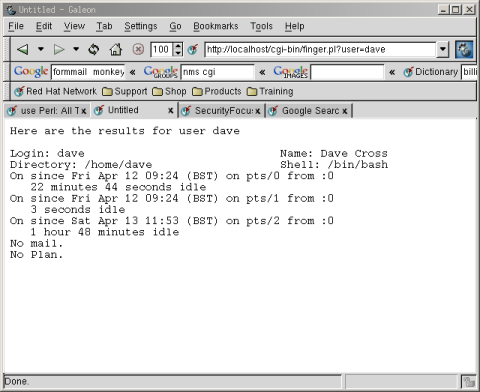
#!/usr/bin/perl -wT use strict; use CGI ':standard'; $ENV{PATH} = '/bin:/usr/bin:/usr/local/bin'; my $user = param('user'); if ($user =~ /^(\w+)$/) { $user = $1; } else { die "Invalid user: $user\n"; } my $who = `finger $user`; print header(-type => 'text/plain'); print "Here are the results for user $user\n\n"; print $who; |
Other Safety Nets
Having fixed the problem with our “finger” example, let’s take a look at how we’d solve the other problems we looked at earlier, starting with the file display script. To reiterate the problem, we have a directory that contains text files which we want to display to the user without them also being able to view our /etc/passwd file. The solution to this is very similar to the solution to our previous problem. We simply use a regular expression that matches our idea of what a filename should be and refuse to do anything if we’re given anything that doesn’t match that. Here is the code|
1 2 3 4 5 6 7 8 9 10 11 12 13 14 15 16 17 18 19 20 |
#!/usr/bin/perl -wT use strict; use CGI ':standard'; my $dir = '/path/to/data/files/'; my $file = param('filename'); if ($file =~ /^(\w[\w\.]*)$/) { $file = $1; } else { die "Bad filename: $file\n"; } print header(-type => 'text/plain'); open FILE, $file or die "Can't open $file: $!\n"; while (<FILE>) { print; } |
Preventing Cross-Site Scripting Attacks
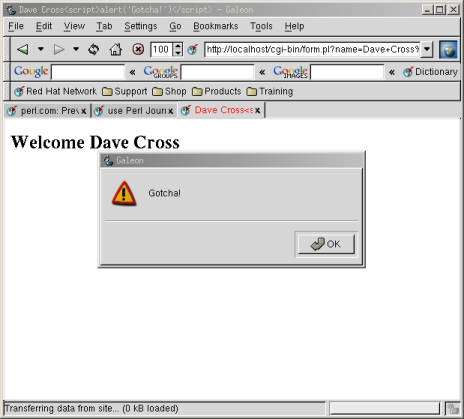
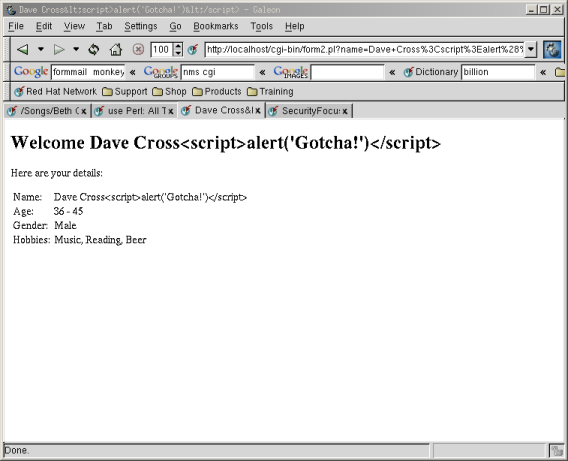
The final danger that we mentioned at the start of this article was that of cross-site scripting attacks where a user can insert JavaScript into data that you are going to display on a web page. Ways to get round this vary. If the data that you’re displaying shouldn’t contain any HTML at all then the brute force approach is to replace all ‘<' characters with the '<' HTML entity before displaying it to the browser. Here's how to make that change to last month's form processing program.|
1 2 3 4 5 6 7 8 9 10 11 12 13 14 15 16 17 18 19 20 21 22 23 24 25 26 27 28 29 30 31 32 33 34 35 36 |
#!/usr/bin/perl -Tw use strict; use CGI ':standard'; my $name = param('name'); my $age = param('age'); my $gender = param('gender'); my @hobbies = param('hobby'); my $list; if (@hobbies) { $list = join ', ', @hobbies; } else { $list = 'None'; } $name =~ s/</</g; $age =~ s/</</g; $gender =~ s/</</g; $list =~ s/</</g; print header, start_html(-title=>$name), h1("Welcome $name"), p('Here are your details:'), table(Tr(td('Name:'), td($name)), Tr(td('Age:'), td($age)), Tr(td('Gender:'), td($gender)), Tr(td('Hobbies:'), td($list))), end_html; |
 If, however, you want to include the ability for users to enter HTML in their data then you have a lot more work on your hands. You would need to keep a list of allowed HTML tags and attributes. Then you would have to parse the users input to work out exactly what they have tried to enter and remove anything that is not allowed. This is far from trivial and I don’t have enough space in this article to go into any more detail. Id you’d like to see an example of how it’s done, please take a look at the guestbook script from the nms project (see box about CGI script repositories).

Very instructive, thank you. I saw the link in Stack Overflow